WhatsApp · Android beta since November 24, 2026
Audio stickers: what they are and how to make them
An audio sticker is a WhatsApp sticker that plays a sound when someone taps it. WhatsApp started turning them on on November 24, 2026, on Android first and gradually. Here you turn a photo (up to 10 seconds of audio) or a video up to 5 seconds long, plus your voice, an audio file from your phone or the video’s own sound, into a 512×512 MP4. That file does not become a sticker on its own: you create it in WhatsApp, and that only works if your account already has the feature. Nothing is uploaded: it all happens in your browser.
Do you already see the wave icon when you create a sticker?
Then all you need is the file
Make the MP4 here, then create it in WhatsApp: stickers → Create sticker → pick the file → audio button → Original sound.
Not in your account (yet)
- Check your version: Settings → About (Android) and look for 2.26.47.1 or newer.
- Having the right version is not enough: the feature is enabled per account and rolls out in waves.
- If your interface is in English you are already in the rollout: do not reinstall or clear data.
Make your sticker
Photo or video + sound → MP4 ready for WhatsApp
Your files never leave your phone: they are processed right here in the browser.
Create your audio sticker in 3 steps
The file you download is a tiny video and it does not show up in WhatsApp by itself: save it to your gallery first, then turn it into a sticker from the sticker panel.
1Step
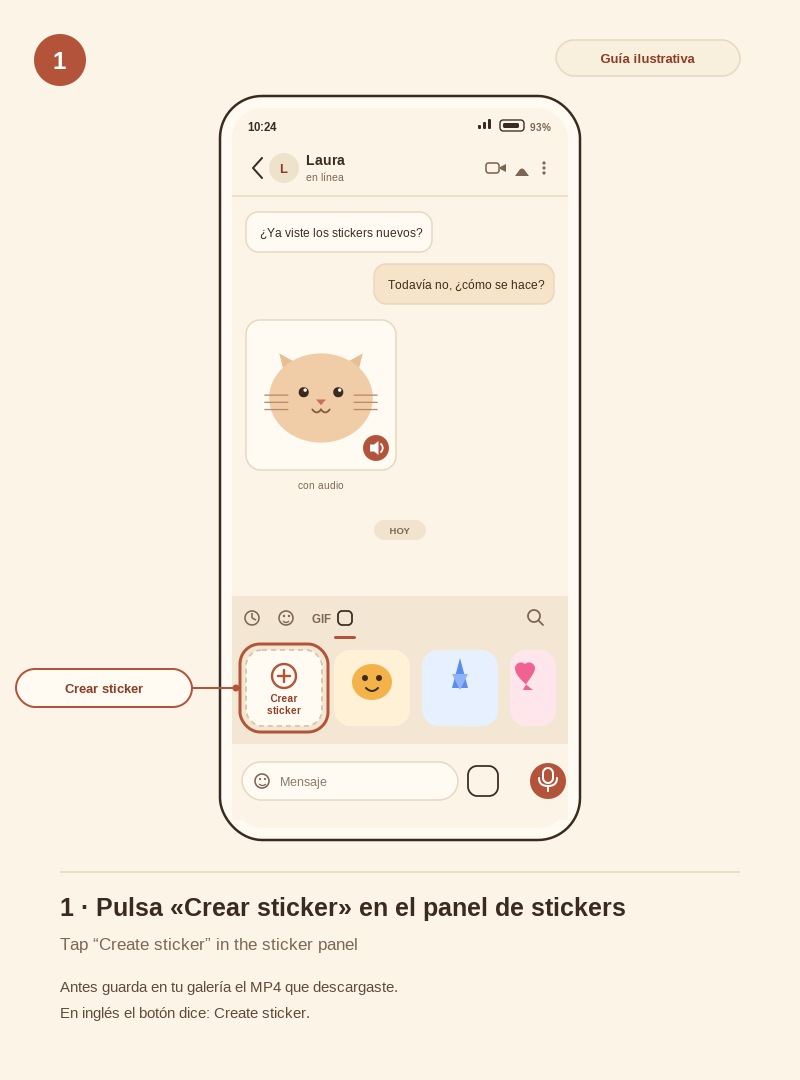
Open “Create sticker” in the sticker panel
Open a chat → sticker icon → Create sticker.
2Step
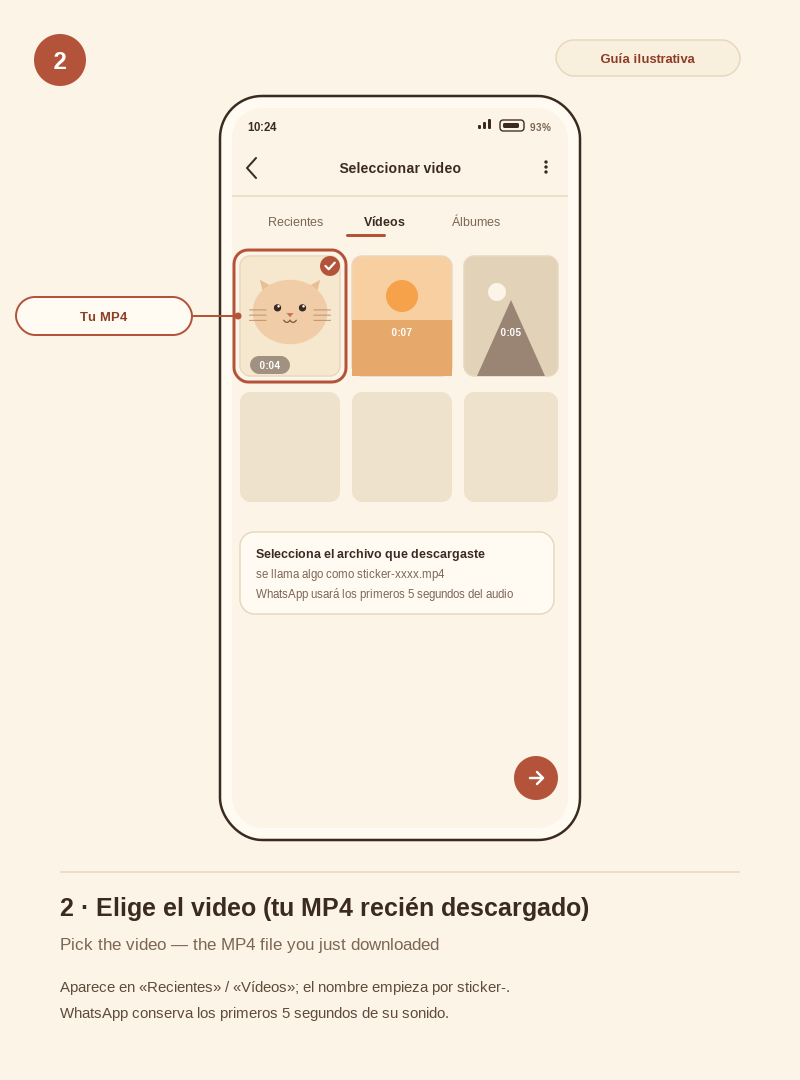
Pick the MP4 you just downloaded
On “Select video”, choose the MP4 you just saved; WhatsApp converts it into an animated sticker.
3Step
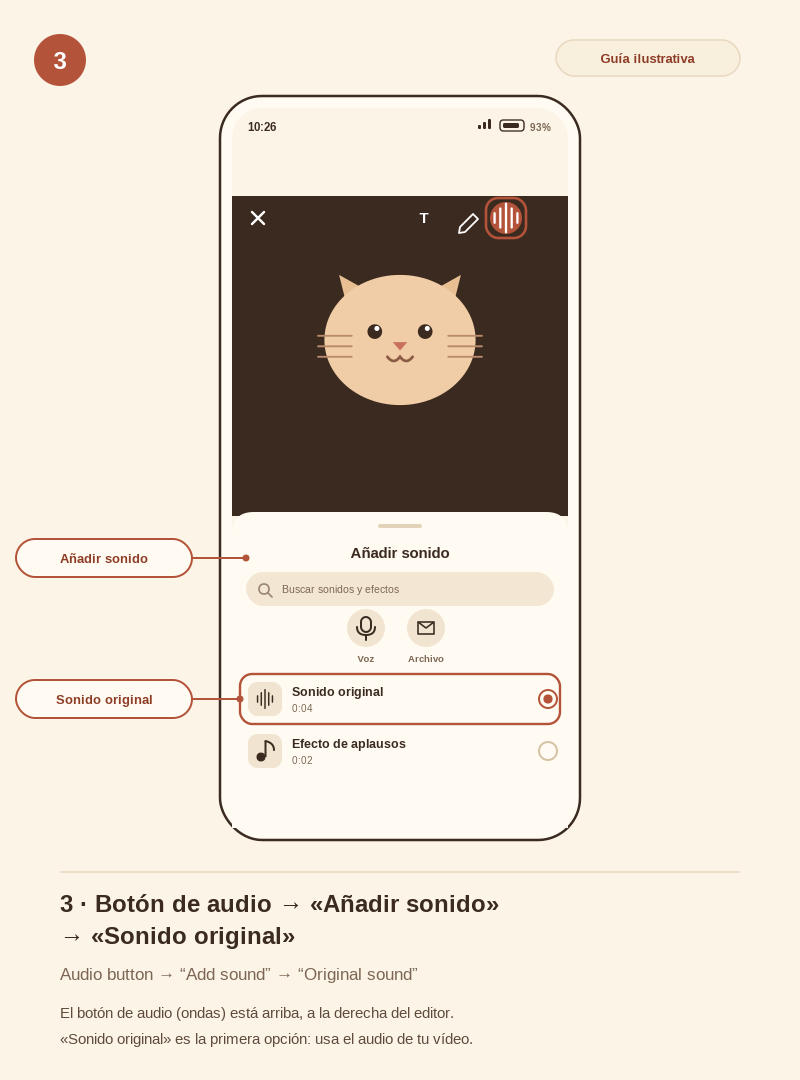
Add the original sound in the editor
Audio button (wave icon, top right) → Add sound → Original sound, the first row.
Button names are given in both languages: during the rollout some accounts see the interface in the other language, so one label alone would leave people hunting for a button that is not there.
What is an audio sticker and how does it play on WhatsApp?
How it sounds: the speaker icon and three plays
An audio sticker is a WhatsApp sticker with a sound track attached. It does not play on arrival: the other person sees a speaker icon and, when they tap it, hears the audio. It plays three times and respects silent mode, like a very short voice note.
People also search for "WhatsApp audio stickers" or "sound stickers": it is all one feature, there are no two different things to look for.
That detail explains most of the confusion: if nobody taps the speaker, the sticker looks mute. It is not a broken file or a failed send, it is how the feature is designed.
How it differs from a voice note and an animated sticker
From a voice note: the sticker takes a sticker slot instead of a long message, and the audio is glued to the image. From an animated sticker: the animated one moves and has no sound; an audio sticker can be static or animated, and what it adds is the sound track.
The file that travels is a 512 by 512 sticker with a short track. That is why the limit is five seconds when it comes from a video, instead of the thirty seconds a normal video gets.
Size, duration and codec: what WhatsApp accepts
These are the numbers that matter when you prepare the file. If yours match, WhatsApp converts it without touching anything.
| File format | MP4 (H.264 video + AAC audio) |
|---|---|
| Sticker canvas | 512 × 512 pixels, square |
| Maximum audio | 5 s when the sticker comes from a video · 10 s when it comes from a photo |
| Typical size | 30–60 KB per audio sticker |
| Where it is processed | In your browser: no file is uploaded to a server |
| Minimum version to create one | WhatsApp beta 2.26.47.1 or newer, on Android |
| iPhone | Create the MP4: yes. Convert it into an audio sticker: not yet |
If you are on iPhone, here is where things stand
You can build the MP4 on iPhone, but the iOS app still cannot turn it into an audio sticker: the editor has no sound button. What does work today, and what has to wait, lives on the iPhone page.
If the option is not there yet
The feature is rolling out gradually and it ships per account: the newest version does not mean your account is included. We wrote down the five checks that actually help and the two things that make it worse.
Audio stickers not showing: what to check →Audio stickers: frequently asked questions
What people keep asking in groups and comments right now.
Does it work on iPhone?
You can create the file on iPhone with Safari 16.4 or newer. The audio sticker itself is not available yet: WhatsApp has not enabled it on iOS (November 25, 2026). You can make and save the MP4 now and use it when the feature reaches your phone.
Why is there no option to add sound?
Because the feature ships per account, not just per version. You need Android with WhatsApp beta 2.26.47.1 or newer and your account inside the rollout. There are five checks that help; reinstalling is not one of them.
How long can the audio be?
Five seconds at most when the sticker comes from a video, which is exactly what this tool produces. For stickers made from a photo, WhatsApp allows up to ten seconds of recorded audio.
Can I send them in groups?
Yes, it sends like any other sticker. It plays when the other person taps the speaker icon, loops three times, and respects the phone’s silent mode.
Can I keep an audio sticker someone sent me?
Yes. Long-press the received sticker and choose “Add to favourites” to keep it in your collection. The audio file itself is not downloadable on its own.
Do I need to update WhatsApp?
To create them yourself, yes: you need a recent Android beta. To receive and play them, no — audio stickers also arrive on older versions.
Is it free?
Yes. The tool is free, with no sign-up, no watermark and no daily limit.
Do you upload my photo or audio?
No. The image, video and audio are processed inside your browser and never leave the device. That is also why the tool keeps working offline once the page has loaded.
Can I use music or a TikTok sound?
Technically yes, but it is on you: the sticker can be forwarded and the music is licensed. For personal use in a group the risk is low; for anything public or commercial, use your own audio or royalty-free sound.
Is this official WhatsApp?
No. It is an independent third-party tool. WhatsApp and Meta do not sponsor or review this site, and we do not use their logos.